Fast Lane or Money Pit? The Honest Truth About Console SSD Upgrades in 2024
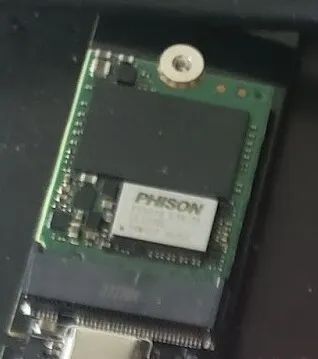
Photo: User5515, CC0, via Wikimedia Commons
Storage upgrades have quietly become one of the most talked-about console hardware topics in recent years. Between the PS5's expandable M.2 slot, the Xbox Series X|S's proprietary expansion cards, and the growing library of massive modern games, it feels like we're all perpetually running out of space and perpetually being pitched solutions.
But here's the thing: not all storage upgrades are created equal, and the marketing around SSD speeds is... let's call it optimistic. Let's cut through the noise.
Why Storage Speed Actually Matters (And Why It Doesn't Always)
The PlayStation 5 launched with a custom 825GB SSD that Sony claimed could hit read speeds of up to 5.5 GB/s. That was a genuinely impressive number in 2020, and games like Ratchet & Clank: Rift Apart were built from the ground up to exploit that speed — with near-instant dimension-hopping that would have been impossible on a hard drive.
But here's where reality gets more nuanced. Most games aren't Rift Apart. The majority of your PS5 or Xbox Series X library was either developed cross-gen or simply wasn't designed around bleeding-edge I/O performance. For those games, the difference between a 5.5 GB/s drive and a 3.5 GB/s drive is... a few seconds on a loading screen. Sometimes less.
Community benchmarks — including tests run by Digital Foundry and shared extensively across Reddit's r/PS5 and r/XboxSeriesX communities — have repeatedly shown that the practical loading time gap between mid-tier and top-tier PS5-compatible SSDs is often under two seconds in real gameplay scenarios. Two seconds. That's worth knowing before you spend $50 more on a faster drive.
The PS5 SSD Expansion: What You Actually Need
Sony opened up the PS5's M.2 expansion slot via a firmware update, and the spec requirements are publicly documented: you need an M.2 NVMe SSD (Gen 4 recommended) with a read speed of at least 5,500 MB/s to match the console's internal drive.
Here's the practical guide:
Budget pick: Drives from brands like Crucial, Sabrent, and Silicon Power in the 1TB range frequently drop to the $60-80 range and perform within real-world margin of error compared to premium options. You're not leaving meaningful performance on the table.
Mid-tier sweet spot: The WD Black SN850X and Samsung 990 Pro consistently benchmark well and often land around $90-110 for 1TB. These are the picks that offer genuine peace of mind without the premium tax of top-shelf options.
The heatsink situation: The PS5 needs a heatsink on your M.2 drive. Some drives come with one included; others don't. If yours doesn't, a third-party heatsink runs about $5-10 and takes two minutes to attach. Don't skip it — thermal throttling is real and will undermine your drive's performance.
One more thing: you need to factor in the physical size. The PS5 accepts M.2 drives in 2230, 2242, 2260, 2280, and 22110 form factors, with 2280 being the most common. Double-check before you buy.
Xbox's Proprietary Problem
Microsoft went a different direction with the Series X|S, opting for a proprietary expansion card slot (the Seagate Storage Expansion Cards) rather than a standard M.2 interface. The upside is simplicity — plug it in, it works, no configuration needed. The downside is that you're locked into one ecosystem of expansion cards, which historically kept prices higher.
The good news: Seagate dropped their official 1TB expansion card to around $100, and Western Digital entered the market with their own licensed cards at competitive pricing. It's not as flexible as the PS5's M.2 approach, but the price gap has narrowed considerably.
For Xbox, the expansion card essentially mirrors the internal storage performance, so there's no speed hierarchy to worry about. Your only real decision is capacity: 512GB, 1TB, or 2TB depending on your library size and budget.
Important note for Xbox users: You can use standard external USB drives with Xbox Series consoles, but here's the catch — you can only play Series X|S optimized games from the internal drive or the proprietary expansion cards. External USB storage is fine for storing and transferring last-gen titles or keeping a backlog accessible, but it won't run your newest games at full performance.
Storage Management: The Free Upgrade You're Ignoring
Before you spend a dime, there's a real argument that smart storage management can extend the life of your current setup significantly.
On PS5: Use the console's built-in storage manager to move games you're not actively playing to an external USB drive. They'll sit there dormant and transfer back quickly when you're ready. A $40 2TB USB external drive from Seagate or WD is a legitimate budget solution for keeping your M.2 slot free for the games you're actually running.
On Xbox: The same USB strategy works for last-gen titles. Keep your Series X|S optimized games on internal or expansion storage; park everything else externally. With Game Pass cycling titles regularly, you may find you're re-downloading games more often than you think anyway.
Delete your captures. Seriously. Video captures and screenshots quietly eat storage on both platforms, and most people never audit them. Clear out what you don't need and you might recover several gigabytes without spending anything.
The Real Cost-Benefit Breakdown
Let's be direct about the math:
- Spending $60-80 on a 1TB PS5 M.2 drive: Almost certainly worth it. You double your storage and get performance that's functionally identical to the premium options in most games.
- Spending $150+ on a top-tier 2TB M.2 drive: Worth it if storage anxiety is real for you and you have the budget. The speed premium over mid-tier drives is marginal.
- Spending $40 on an external USB drive for overflow storage: Excellent value for both PS5 and Xbox users managing large libraries.
- Paying a significant premium for the absolute fastest Gen 4 drive on the market: Probably not necessary unless you're chasing benchmarks rather than gameplay.
The honest answer is that for most people, a mid-tier 1TB M.2 SSD on PS5 or the official 1TB expansion card on Xbox represents the best value proposition. You'll get the storage relief you need, the performance will meet the platform's specs, and you won't notice a real difference on a loading screen compared to the most expensive options.
Bottom Line
Storage upgrades for modern consoles are a legitimate quality-of-life improvement — more space, no compromising on what you keep installed, and real benefits for games built around fast I/O. But the speed arms race in SSD marketing is largely irrelevant at the consumer level. A drive that meets your console's minimum spec requirements will serve you just as well in real gameplay as one that exceeds them by 20%.
Spend smart. The best storage upgrade is the one that fits your library, your budget, and your actual gaming habits — not the one with the biggest number on the spec sheet.